
You start your Mazda 3 or CX-30, press the i-Stop OFF button… and next time you start the car, you have to do it all over again. It is one of the most common questions from owners of recent Mazdas. Here is what i-Stop is, why so many drivers prefer to turn it off, and how to disable it once and for all, without touching the original wiring.
What is i-Stop?
i-Stop is Mazda's Start-Stop system. When the car comes to a stop (traffic lights, traffic jams), the engine switches off by itself, then restarts as soon as you release the brake or press the clutch. The aim: slightly reduce fuel consumption and emissions in town.
The system does not always kick in: a cold engine, a battery that is not charged enough, heavy air-conditioning demand or a turned steering wheel can stop it from cutting the engine.
Why disable it?
Many drivers find i-Stop more annoying than useful day to day:
- Restarts in town: at every stop, the engine cuts out then starts again, sometimes with a slight jolt.
- Tricky junctions: stop signs, roundabouts, pulling out of a car park… you want the engine ready straight away.
- Comfort: in summer, ventilation can be less effective while the engine is off.
- The real benefit: on open roads and motorways, i-Stop hardly ever comes into play. The saving is mostly limited to urban trips with lots of stops.
Why the i-Stop OFF button is not enough
Your Mazda does have a button to turn i-Stop off. But the setting is not remembered: every time you start the car, the system switches back on. So you have to remember to press the button on every trip, which most drivers end up forgetting.
3 ways to stop putting up with i-Stop
- Press the button every time you start: free, but tedious and easy to forget.
- Coding with a diagnostic tool: possible on some models, but you need the right tool and know-how, and a dealer software update may erase the setting.
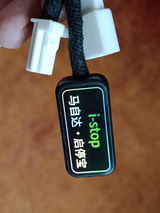
- A disabling module: a small box that plugs in behind the button and turns i-Stop off automatically at every start. It is the simplest solution, and it is reversible.
How the disabling module works
Our i-Stop disabling module for the Mazda 3 BP and CX-30 plugs in between the Start-Stop button and the original wiring loom. No wires to cut, no coding: you start the car and i-Stop is already off. The original button still works as normal.
Installation: the main steps
- Switch off the ignition.
- Reach the back of the i-Stop OFF button, located near the steering wheel, by gently unclipping the panel that holds it (a plastic trim tool avoids marking the trim).
- Unplug the button's connector and fit the module between the button and the loom.
- Tuck the module away behind the panel so it does not rattle, then clip everything back.
- Test: start the car; the i-Stop OFF light should come on by itself.
It takes a few minutes. To go back to the original setup, simply remove the module and plug the original connector back in.
Frequently asked questions
Can it damage the car?
No. The module does not change the car's wiring or software. It works just as if you pressed the i-Stop OFF button yourself.
What about the warranty?
No coding is done and the fitting is reversible. If you have any doubt before a dealer visit, you can remove the module in a few minutes.
Is it allowed?
Mazda itself provides a button to turn i-Stop off, so the choice is the driver's. The module simply automates that choice at every start.
Will I use more fuel?
In town, with lots of stops, consumption may rise slightly. On open roads and motorways, the difference is practically zero.
Which version should I choose?
The module is available for the Mazda 3 BP (2019 onwards), the CX-30 (2019 onwards) and the CX-50, in left-hand drive (France, continental Europe) or right-hand drive (UK, Ireland, etc.) versions. It is not suitable for cars without i-Stop.
Discover the i-Stop disabling module and all our other feature accessories in our Mazda 3: Features and CX-30: Features collections.